
Knows your documents
Ask in plain language. It will find relevant sections across documents and show exactly what the answer is based on.
Contracts, laws, directives, reports – each in a different system, with different validity periods. Instead of spending hours searching, you’ll get a precise answer in a matter of seconds.
These are the pain points we hear most often from businesses. That’s why we’re building an AI document assistant tailored precisely to what’s really troubling them.
Ask in plain language. It will find relevant sections across documents and show exactly what the answer is based on.
It understands the relationships between business documents. It identifies connections that a manual search would overlook.
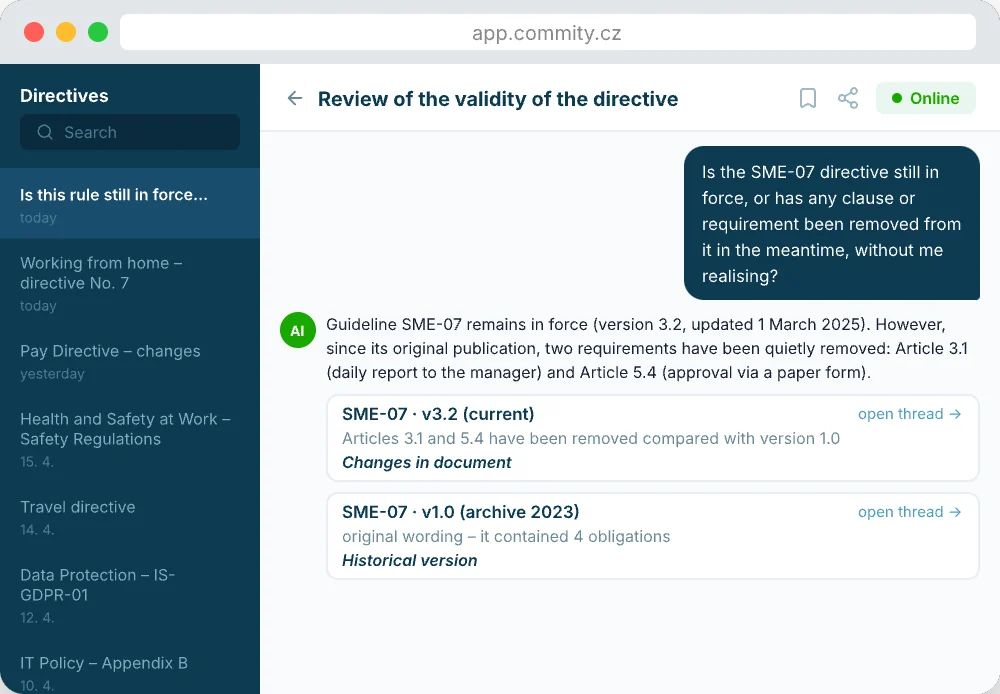
It knows what applies at any given time. It distinguishes between what used to apply and what applies today, and always work with the correct version of the document.
It draws exclusively on the documents you provide. If an answer isn’t available, it says so clearly. No hallucinations.
It integrates with your internal systems — rather than creating yet another isolated tool, it builds a single source of corporate knowledge and memory.
A solution designed for your documents and processes
A general-purpose tool with no knowledge of your context
The AI document assistant does not replace expert judgement.
It helps you work with your documents more quickly and efficiently.
USE CASES
Whether it’s internal guidelines, audit documentation, supplier contracts, purchase orders or internal procedures — the assistant performs semantic searches within them, understands their structure and checks their validity. By integrating with your systems, a single knowledge base is created rather than yet another isolated tool, while your data is also ready for further use with AI.
In which version of the Act was Section 150 amended, and how exactly?
Which of our contracts are due to expire within the next 60 days and don’t have a follow-on amendment yet?
Which version of the SME-07 directive is currently in force, and what has changed compared with the previous one?
Which pieces of equipment in facility management are due for their next inspection or test this quarter?
THE COLLABORATION PROCESS
We’ll tailor the deployment of the AI document assistant to suit the state of your data and systems — without unnecessarily disrupting the way you currently work.
CONSULTATION AND ANALYSIS
We’ll take a look at where your documents are stored, how your team works with them, where you lose the most time, and how ready they are for integration. You’ll receive a detailed proposal, including integration and data security.
RAPID PROTOTYPE
Using a small sample of your documents, we’ll show you how the assistant responds to your specific questions. You’ll see the actual results even before full deployment.
PROJECT IMPLEMENTATION
We are gradually integrating the assistant into all your resources — this isn’t a one-off connection, but a long-term process that grows alongside your business.
Both the application and the search index run on Azure in the EU, while the original documents remain in your possession. No one at Commity normally has access to your data; access is only permitted when resolving an incident and is recorded in the audit log.
No. The assistant inherits permissions from your storage and only searches documents to which the user has access. Changes to permissions are reflected in the assistant after a short delay, not immediately.
Common text and office formats — Word (DOCX), OpenOffice (ODT), RTF, TXT, Excel, PowerPoint — and PDFs, including scanned documents and images containing printed text, which we convert using OCR. We do not process handwritten notes in scans.
To SharePoint and OneDrive (Microsoft 365), Google Drive and Azure Storage. If your documents are not stored in cloud storage, you can upload them individually or in batches. We handle integration with other systems on a case-by-case basis.
No. Your documents are used solely to answer your queries. We do not use them to train any models, and we have a contractual commitment to this effect from the language model provider.
Each user has their own login. Each customer’s data is kept separate from that of others. We keep a record of who asked what and when, and will provide this to you on request. The assistant only reads documents — it does not alter them in any way nor perform any actions on your systems. The processing of personal data complies with the GDPR and is governed by a data processing agreement. The assistant is designed as a support tool, where decisions are always made by a human, in accordance with the requirements of the AI Act.
We will delete everything you have stored with us — copies of documents, the search index and extracted data — and will confirm the deletion in writing. We will request your confirmation before proceeding with the deletion. Your source data will remain unaffected by the termination.
Get in touch and we’ll discuss it together. Online or offline!
